Computer Vision Parking Tracker
Hello everyone. Seeing that this is my first blog post, I hope to be very free with my writing and just create something enjoyable for you to read. Enjoy.

Hello everyone. Seeing that this is my first blog post, I hope to be very free with my writing and just create something enjoyable for you to read. Enjoy.
This project is mainly being done for my ‘Software Engineering 2’ course at my university, The University of the West Indies (UWI). There were not many restrictions in what we could work on but the biggest focus of the project was for us to adhere to the SCRUM methodology of software development.
The project my group decided on was to create a software that could recognize cars in a car park, specifically a carpark from my university and recognize how many parking spots were taken up. Then to take the information gathered and present this in a public medium like a web app, to students of UWI.
3
Having a proper process for developing software can seem tedious and boring but, once you have these artifacts developed and start coding, you’d see the great benefits it provides when coding. In helps to structure the code you right. It also helps with time management. If I were to approach this with no structure and no time frame then it would be very easy to do tasks too late.
Quite a bit has happened since the beginning of this project but I sadly didn’t have it all well documented under dates so under this post, I’ll cover everything notable that’s happened for me.
So the main requirement of this project is to follow the SCRUM agile development model. Without going into specific terminology, it seems to be one or the more informal models, or rather, more interactive models.
Of all the models I’ve studied for this course, I think SCRUM is definitely my favourite because it doesn’t feel as strict. It may be because I’m just doing this with a couple of friends, but I also like the idea of the regular quick meetings, being able to get together and discuss progress and even share ideas.
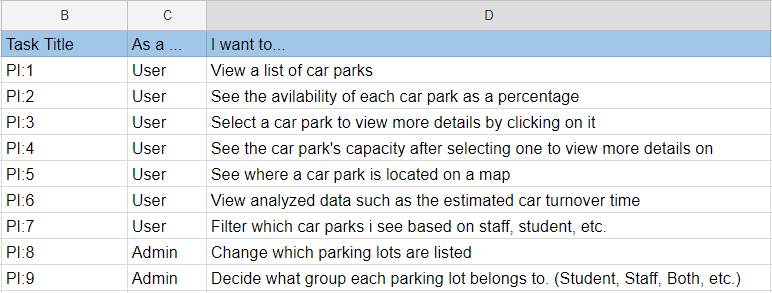
To get the requirements, one person had to act as the ‘Product Manager’ and list requirements but honestly, everyone in the group listed requirements just so we could get the best out of the system. To be fair though, the product manager started it off.
This is the result of developing our product and sprint backlog:
6
Firebase and other platforms like it such as Amazon Web Service were things I avoided for a point in time because it seemed intimidating to learn. When people would talk about syncing up databases, cloud storage and other processes, I would be slightly intimidated and thus I stayed away from trying it for a long time. After doing this project and another project that dealt with firebase, I learned that it’s all about taking your time to get a good understanding of the frameworks but most importantly, just dive into a very simple project using the software. There is rarely a better way to learn than by actually using it, running into errors and learning from the errors.
Its been too long since I’ve updated this blog but better late than never?
So since the last post, there’s been notable progress although there should have been more.
Firstly ill start with the members of my group, our progress, challenges and other factors affecting the completion of the project. From the SCRUM methodology, this is called the ‘Project Retrospect’
The first task in terms of creating the product was for me to create the angular material project. Initially, we discussed this task to be for Rachel and Zachary (my two other group members), but for the sake of time, I thought it would be best for me to initialize the project as it involves alot of one time steps that they wont need to be concerned about in creating the project. As I had done this a couple times before, there weren’t any major errors and the angular project was up and running quickly but this was only locally.
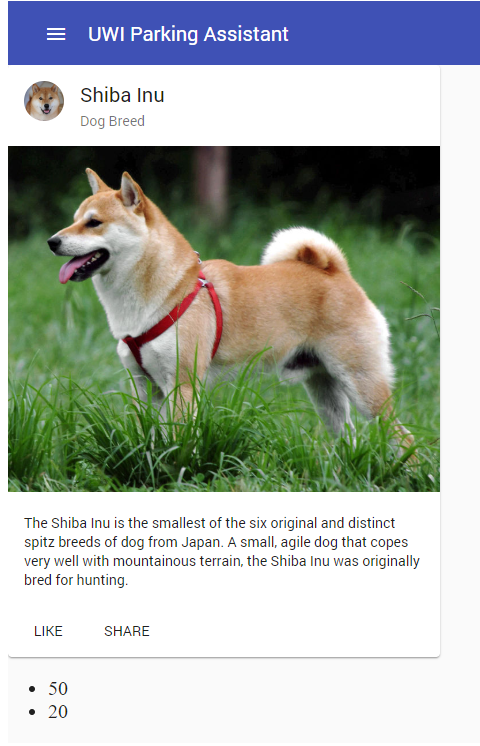
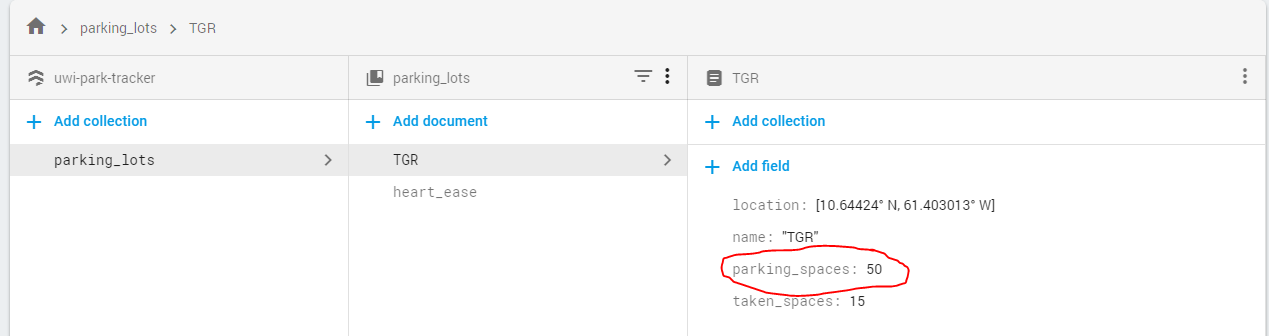
I then moved onto integrating Firebase Firestore for our database needs and Firebase Hosting to host the web application for the public to use. Luckily, Angular being as popular as it is, it made it easy to sync up Firestore to Angular and after some time tinkering, I was able to connect the database to the web application and any changes to the values in Firestore was reflected in the web app by using two way data binding in Angular.
Next I’ll talk about what I’ve been doing for the Raspberry Pi
Sadly we haven’t gotten into the meat of the Pi code which is the computer vision to recognize the number of cars but one step at a time.
Firstly I needed to learn to send data from the Pi to Firebase Cloud Firestore. Firsestore is a NoSQL document database which I personally feel to be an improvement on the existing Firebase Realtime Database in terms of usability. My goal was just to be able to send data from this program to Firestore so that it would update the WebApp we had created for it.
The first step was, obviously, to install all the dependencies and libraries so that we could perform these functions. After the setup phase, I went on to write basic code to see if I can pull values I put into Firestore.
After some reading and tinkering I was able to create code to change the values of some data in Firestore periodically. For testing I had the values change every 10 seconds but this probably wont be the value used for the product.
def activate():

    tgr_ref = uwi.document(u'TGR')

    while True:

        time.sleep(10)
        print("Sending new info")
        parkingLots[0].setTSpaces(parkingLots[0].tSpaces + 5)
        tgr_ref.update({u'taken_spaces' : parkingLots[0].tSpaces})
        tgr_ref.update({u'parking_spaces': 55})

        tgr = tgr_ref.get()
        print("Available spaces:", tgr.to_dict())

        time.sleep(10)
        print("Sending new info")
        parkingLots[0].setTSpaces(parkingLots[0].tSpaces - 5)
        tgr_ref.update({u'taken_spaces' : parkingLots[0].tSpaces})
        tgr_ref.update({u'parking_spaces': 50})

        tgr = tgr_ref.get()
        print("Available spaces:", tgr.to_dict())
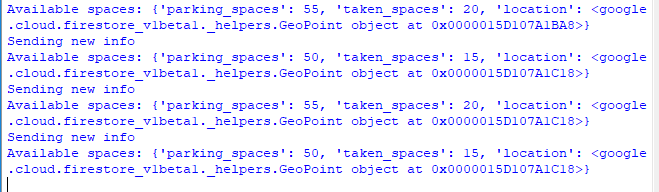
Which basically gave me this. The data isn’t properly formatted but you can see that there is a value that changes between 50 and 55 every 10 seconds which is reflected in Firestore.
4
Working with the Raspberry Pi is something I’ve been looking forward to doing for a long time because of my interest with IoT, Robotics and Machine learning, but before diving into those things, I would have to learn to work with the basics of the Pi. Its not always practical to have to dedicate an entire monitor to display the GUI of the Pi so I learned about using VNC to display the GUI of the Pi and SSH to access the terminal. I only used it to make things easier for me to work with when setting things up but I’m sure there are more practical uses such as running files while the Pi is set up in a different location on the same network.
So to begin this post, I want to cover briefly what was talked about in our meetings between posts.
In terms of discussing what we got done, there was not much to report on aside from learning about the frameworks we had to develop the application with.
For the challenges, we also shared the same challenge which was the time spent on coding and so we decided to devote Tuesdays to focus on this project.
Another thing we talked about, was the development of test cases and continuous integration. The test cases would have to be developed differently for the web app opposed to the Raspberry Pi code but we each needed to get them done. We also needed to integrate a method of continuous integration, in which we agreed to use Circle CI.
So I am proud to type that progress was made :) Not as much as I had desired but we can definitely finish this sprint with ample testing.
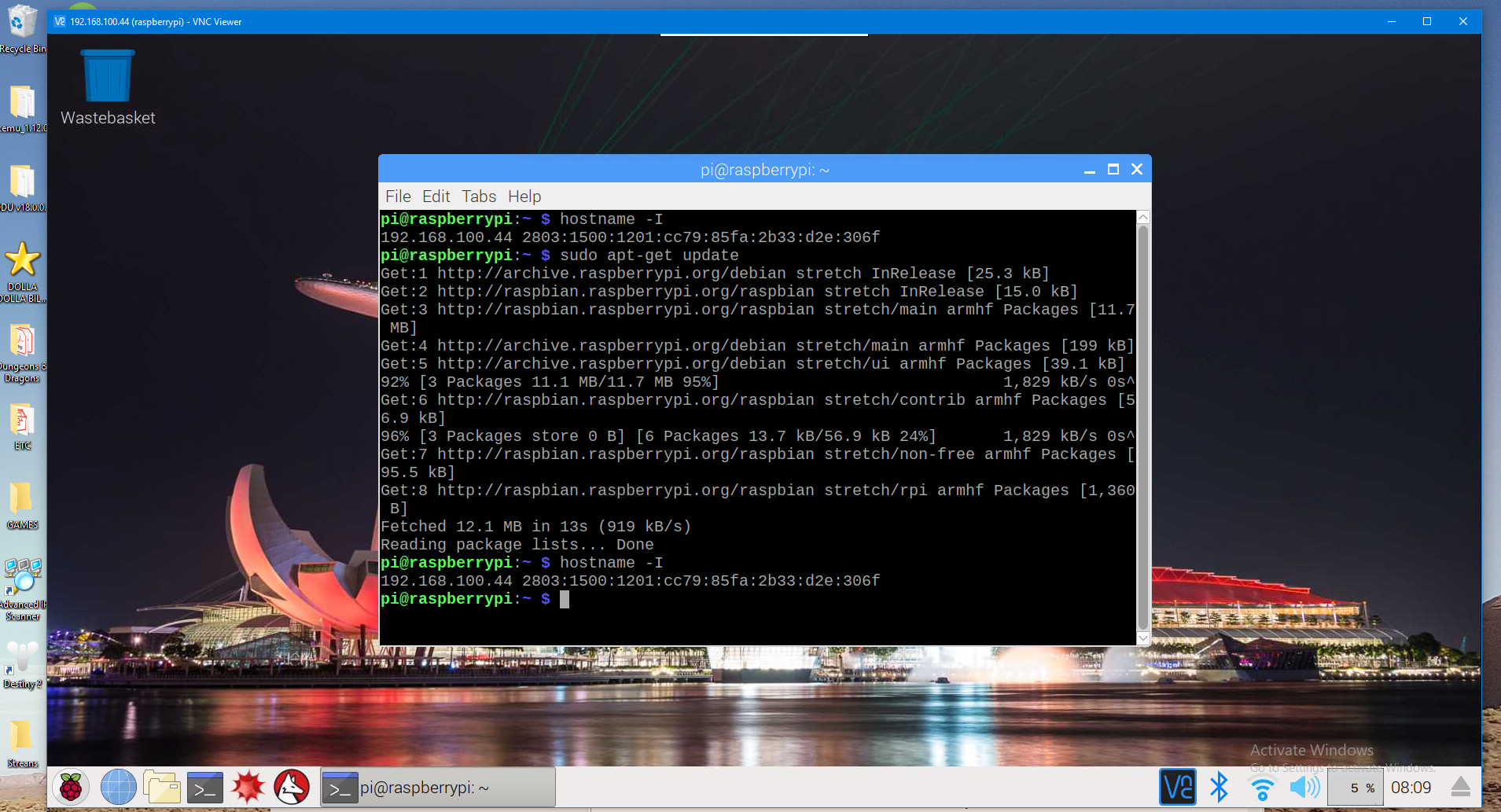
For this post, I’ll talk about my journey to remotely accessing the Raspberry Pi. To drastically increase my workflow, I needed to access the Pi’s GUI remotely. This may have had to been done regardless of increase in productivity.
To remotely access the Pi’s GUI, I had to SSH, Secure Shell, into the Pi. This was done through an application called PuTTY. This allowed me to be connected to the Pi’s terminal as long as we were on the same network. This alone did not provide me with the GUI I needed so after getting the Pi’s IP address, I used an application called VNC Viewer and after entering the IP address into this application, I was able to see the GUI.
10
For this post, I definitely learned a major yet obvious lesson which was when it comes to libraries and frameworks, its not as easy as pip install library. It seems like a fairly obvious lesson but from what my usual coding would entail, I’d become very used to pip installing anything I would need for my python code. When it came to installing libraries on the Pi, it was a completely different story.
It was finally time for the computer vision work to be done on the Pi. It would first involve me installing the needed library for computer vision which I decided would be OpenCV seeing that its the most popular. After looking for guides to do this, I realized it would take alot more than a pip install to get it up and running. I followed this guide which did a great job at walking you through installing OpenCV on the Pi which involved compiling the library from the source code. After alot of time spent installing, starting over, reinstalling the OS on the Pi and trying again, I was finally able to get OpenCV working. I then tried running code to take a picture from a webcam and display it which thankfully, took less time to code up than installing OpenCV.
This is when I encountered a major issue, the camera was very … dated and the image I saw was barely recognizable. I had to find an alternative camera to use so I decided to try using a Microsoft Kinect camera because it was the easiest for me to get seeing that I could borrow it from a friend. The next step from would be to find a way to treat the Kinect like a normal camera to take pictures and upload to Firebase.
After my frustration with working with the Pi, I decided to take some time to integrate continuous integration for the Angular project. This would involve uploading the project to GitHub which was done when the project was created. I would then need to pick a continuous integration service which I chose to be CircleCI since I was already familiar with it, or atleast more familiar than with other software. After a few struggles with setting up the config.yml and correcting the unit tests for the Angular project, CircleCI had been integrated. Now, when someone on the team makes a change to the Angular project and pushes it to the remote GitHub repository and they push to master, the code in the config.yml would be run. This causes the code to be built and tested and once the unit tests pass, the newest version would be hosted in Firebase Hosting. This helped create a workflow to minimize errors by addressing them as they show up for each unit of the entire project.
Hello everyone. Seeing that this is my first blog post, I hope to be very free with my writing and just create something enjoyable for you to read. Enjoy.